 EmailFast
Every inbox for Cloudflare Email Routing, compared (2026)
Cloudflare Email Routing has no inbox. Every way to read and reply, from Gmail forwarding to self-hosted Workers and native Mac apps, compared on cost, security and upkeep.
The short answer: Cloudflare Email Routing does not give you an inbox. It only forwards mail or hands it to a Worker. To read and reply in one place without forwarding to Gmail, you run an app in your own Cloudflare account: an open-source web app like Cloudflare’s agentic-inbox, Mailflare or cloud-mail, a paid web app like MarkRelay, or a native Mac app like EmailFast. All of them receive through Email Routing, and most send through Cloudflare Email Sending, which needs the $5-a-month Workers Paid plan to send to anyone.
Disclosure: I make EmailFast, one of the apps below. I have tried to be fair. Every claim about another app links to that project’s own README or website, as read on 27 November 2026, and where a project does not say something, the table says so rather than guessing.
Why Cloudflare Email Routing needs a separate inbox
Cloudflare Email Service has two halves. Email Routing receives mail and either forwards it to a verified address or passes it to a Worker. Email Sending sends mail from your domain. Neither stores mail, shows it to you, or keeps a Sent folder, so the inbox has to come from somewhere else.
Cloudflare’s own overview describes the two halves as Email Sending, which “sends outbound transactional emails”, and Email Routing, which “processes incoming emails with Workers or forwards them to destination addresses”. That is the whole product. There is no webmail, no IMAP server and no storage. The full breakdown of what each half does and costs is in Cloudflare Email Routing vs Email Sending.
Put plainly, Cloudflare built the plumbing for sending and receiving, not a mailbox you read. That gap is what every app on this page exists to fill.
The three ways to get an inbox
You can forward Cloudflare-routed mail to an inbox you already have, such as Gmail, iCloud or Fastmail; deploy an open-source inbox app as a Worker in your own Cloudflare account; or use a packaged app that installs that Worker for you. Forwarding is the easiest, but replying from your domain gets harder in January 2027.
1. Forward to an inbox you already have
A routing rule or catch-all forwards everything to a verified address, usually Gmail. It costs nothing and you keep your existing app. Two problems:
- Replying. Gmail is removing “Send as” for addresses it does not host in January 2027, on the web and in the mobile apps. I cover what breaks and the ways round it in Gmail “Send as” ends January 2027.
- Mixing. Mail for six projects lands among your bank, your family and your newsletters.
Forwarding into iCloud or Fastmail has the same reply problem in a different shape: those providers will send from your domain only if they host it, which means moving the domain’s MX records away from Cloudflare.
2. Self-host an open-source app
Several open-source projects deploy a Worker, a database and storage into your account, with a “Deploy to Cloudflare” button. You get a web inbox for free, and you own the upgrades, the security patches and the backups.
3. A packaged app in your account
A paid app installs and updates the same kind of Worker for you. You pay for the software and the upkeep; the mail still lives in your account.
The comparison
The apps below differ on four things that matter more than features: whether you use them in a browser or a native app, whether stored mail is encrypted with a key you hold, how they control access, and who keeps them updated. Prices are the projects’ own; everything else is from each README or site, checked 27 November 2026.
| App | Type | Price | Own-key encryption | Updates |
|---|---|---|---|---|
| EmailFast | Native Mac app | $129 once | Yes (HPKE) | Signed app |
| agentic-inbox | Web, self-hosted | Free (Apache-2.0) | No | Redeploy |
| Mailflare | Web + Mac client | Free; Pro $29 once | No | Redeploy |
| cloud-mail | Web, self-hosted | Free (MIT) | No | Redeploy |
| HQBase | Web, self-hosted | Free (AGPL-3.0) | No | Releases |
| heyflare | Web + Mac wrapper | Free (MIT) | AI keys only | In-app |
| MarkRelay | Web, packaged | From $99/yr | No | One click |
| Ayoh | Web, self-hosted | Free (per site) | No | Not stated |
| Domain Send | Web, hosted | 1 free, $9.99/mo extra | No | Hosted |
A few notes on the rows, because a table flattens things:
- agentic-inbox is Cloudflare’s own project. It needs Cloudflare Access in production and sends through the
send_emailbinding. Its README says “any user who passes the shared Cloudflare Access policy can access all mailboxes in this app by design”, including over its MCP server, and that “there is no per-mailbox authorization”. Fine for one person; worth knowing for a team. It also ships a Workers AI agent that can read and draft. - Mailflare is the broadest: email, calendar, booking, Drive and AI agents, deployable to Cloudflare, Docker or Vercel. Its hosted Mailflare Cloud, from $4 a month, is a different thing: that runs on Mailflare’s infrastructure, not yours.
- heyflare is a HEY-style client. Its Mac app is a Tauri 2 wrapper around WebKit, and its README says downloaded builds “aren’t notarized yet”.
- Domain Send is a hosted web inbox for Cloudflare Email Routing, described by its founder in August 2026. I list it for completeness; it is the only one here that does not say it runs in your own account.
GitHub stars on 27 November 2026, for a sense of how many people use each: cloud-mail 16,614, agentic-inbox 8,849, Mailflare 7,783, HQBase 373, heyflare 34. agentic-inbox’s last push was 23 April 2026; Mailflare’s was today.
If you want a native Mac app
On a Mac, “native” covers three different things: an app written with Apple’s own frameworks, a web app wrapped in a WebKit shell, and a plain browser tab. EmailFast is the first kind. Mailflare offers a Mac client over JMAP. heyflare’s Mac app is a Tauri wrapper. Everything else runs in the browser.
Why it matters day to day: keyboard handling, offline reading, notifications, search speed, and whether the app looks and behaves like Mail or like a website. None of that shows up in a feature table.
| EmailFast | Mailflare for macOS | heyflare Mac app | |
|---|---|---|---|
| What it is | Native macOS 26 app | Native client over JMAP, per Mailflare’s site | Tauri 2 wrapper around WebKit |
| Talks to | Your emails-mailbox Worker |
Your Mailflare server’s JMAP endpoint | Your heyflare Worker |
| Signed and notarised | Yes, Apple Developer ID | Not stated | Not yet notarised, per its README |
| Price | $129 once | Needs Pro, $29 once | Free |
Apple Mail is not on this list because it cannot read Cloudflare-routed mail directly; there is no IMAP mailbox. It can send through Cloudflare’s SMTP server, which I set up step by step in the Gmail Send as guide.
Security models compared
Three questions separate these apps. Is stored mail encrypted with a key you control, or readable by anything with access to the account’s databases? How is access controlled: one shared policy, per-mailbox permissions, or per-device keys? And what does Cloudflare see? The last answer is the same for all of them.
Encrypted with your key, or stored readable
Cloudflare encrypts its storage products at the platform level. That protects disks, not your mail from someone with access to your account. Most apps here store messages in D1, Durable Object SQLite or R2 in a form the Worker, and anyone with dashboard or API access, can read. That is a reasonable trade for a team webmail that needs server-side search.
EmailFast does it differently. During setup your Mac creates a mailbox key and the Worker only ever gets the public half. Each message and its attachments are sealed with HPKE (RFC 9180) as they arrive, before they are stored. Only your Macs can open them. A few things stay readable so the mailbox works while your Mac is off: sender, recipient address, time and size, your block rules and out of office, and a sent message while it waits for undo send or a scheduled time. The details are on the security page.
The cost of that design: no server-side full-text search, and if you lose every Mac and the recovery key, nobody can open the mail, including me.
Access control
- One shared policy: agentic-inbox puts Cloudflare Access in front of the whole app. Pass it and you can open every mailbox.
- Per user or per mailbox: Mailflare, cloud-mail, HQBase and MarkRelay have user accounts with permissions.
- Per device: EmailFast has no passwords. Each Mac makes a signing key inside its Secure Enclave, and the mailbox only accepts keys you added through your own Cloudflare account.
Whichever you pick, turn on two-factor sign-in at Cloudflare. Whoever controls the Cloudflare account controls the mailbox.
What Cloudflare always sees
Email Routing handles every message in plain form while it delivers it. That is true of any mail provider, and none of these apps changes it. Sealing protects mail once it is stored, not in transit to your Worker. If you send through Email Sending, also note that Email preview keeps the content of sent messages in your dashboard for about seven days, on by default for new sending domains.
What EmailFast looks like in practice
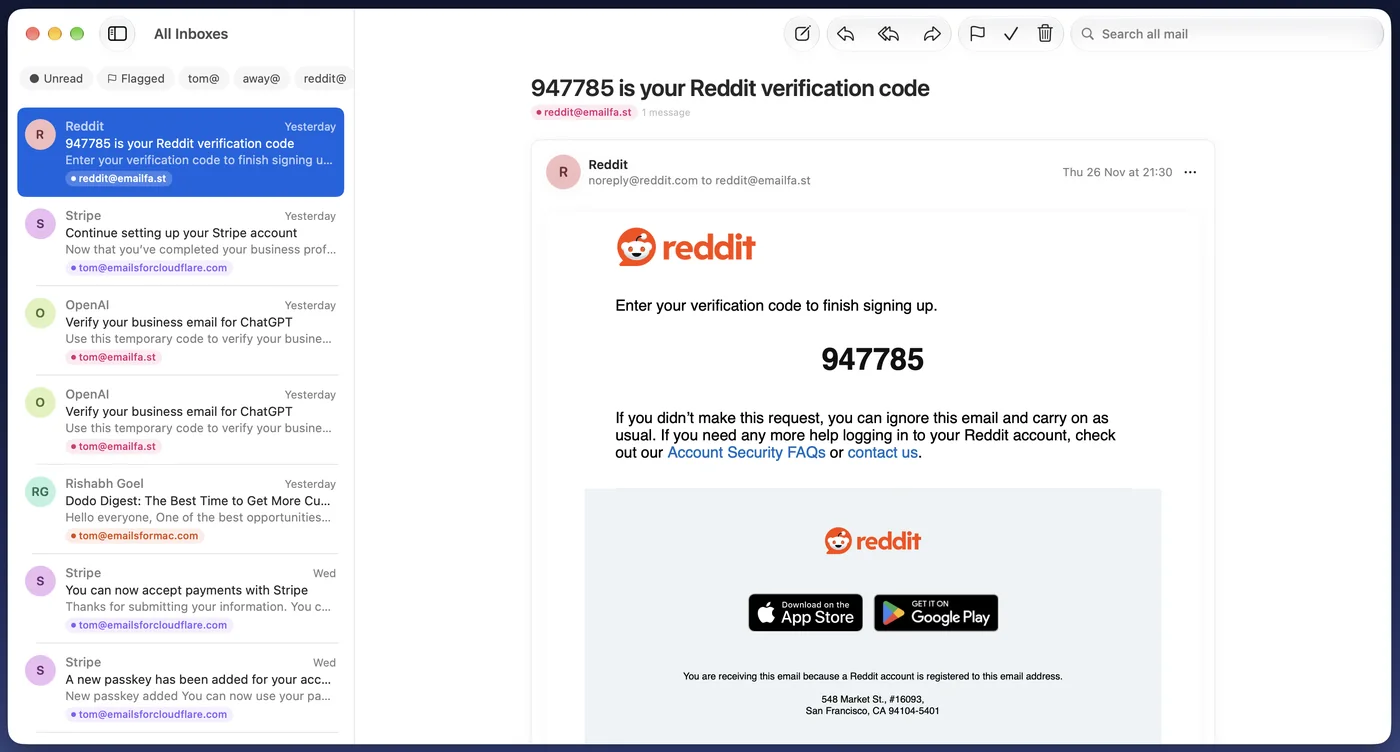
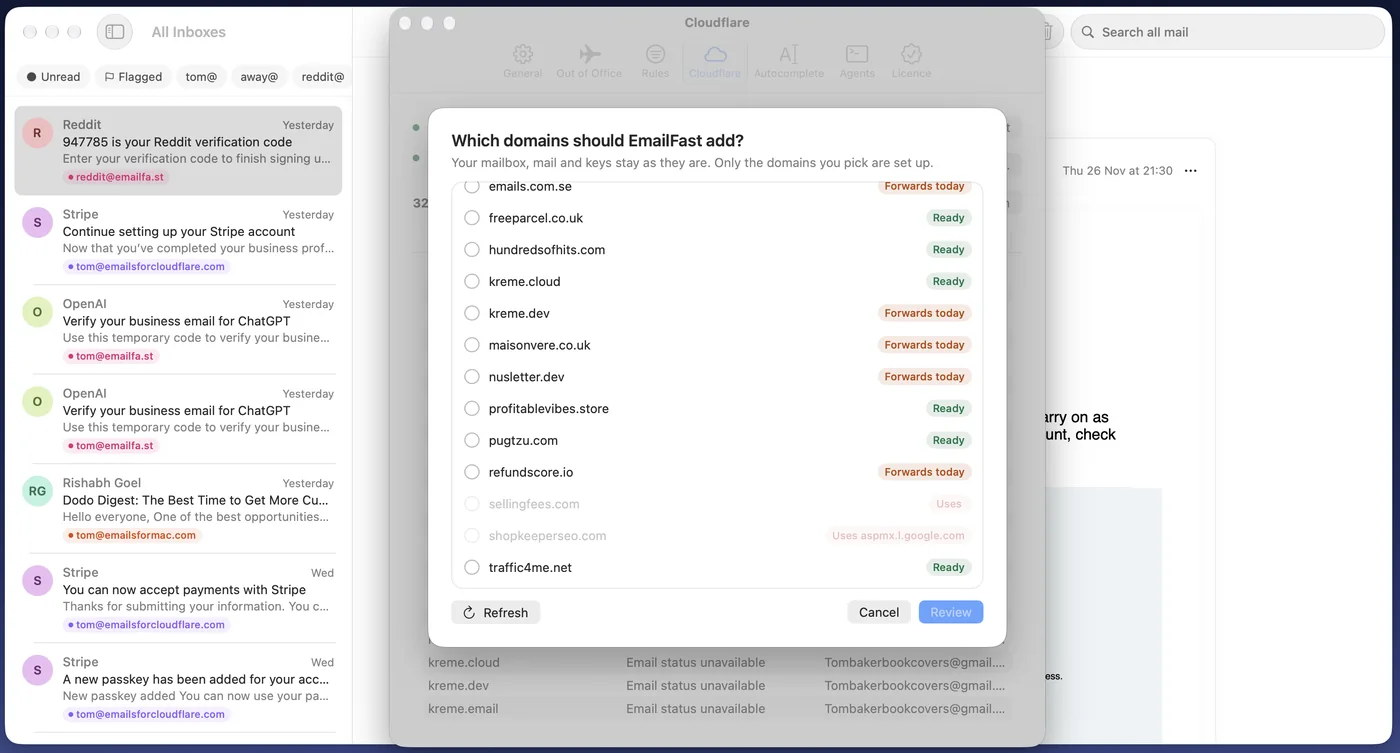
Here is the unified inbox handling multiple Cloudflare domains (emailfa.st, emailsforcloudflare.com, and emailsformac.com) in one native macOS window, alongside the Cloudflare domain picker that checks each zone’s existing MX records before enabling catch-all:
What it costs over three years
For one person replying through Cloudflare, every option carries the same $180 for three years of Workers Paid unless the account already has it. On top of that, the open-source apps cost nothing, MarkRelay starts at $99 a year, and EmailFast is $129 once. Hosted mailboxes charge for themselves but do not need Workers Paid.
| Option | Software, 3 years | Cloudflare Workers Paid, 3 years | Total, 3 years | Notes |
|---|---|---|---|---|
| Forward to Gmail, reply via Cloudflare SMTP | $0 | $180 | $180 | Desktop app for replies after January 2027 |
| agentic-inbox | $0 | $180 | $180 | Plus any Workers AI use; you maintain it |
| Mailflare Community, sending via Cloudflare | $0 | $180 | $180 | $0 Cloudflare cost if you send via Resend’s free tier |
| Mailflare with the Mac app | $29 | $180 | $209 | Pro licence activates the Mac client |
| EmailFast | $129 | $180 | $309 | $129 if your account already has Workers Paid |
| MarkRelay | from $297 | $180 | from $477 | From $99 a year |
| Fastmail Individual, own domains | $168 to $180 | Not needed | $168 to $180 | MX moves to Fastmail |
| Google Workspace Business Starter | $252 | Not needed | $252 per user | MX moves to Google |
| Migadu Micro | $57 | Not needed | $57 | 20 outgoing messages a day |
| iCloud+ 50 GB | $35.64 | Not needed | $35.64 | Up to 5 domains, 10 addresses each |
Workers Paid is $5 a month per account with 3,000 emails included, per Cloudflare’s pricing. Other prices are from Fastmail ($168 for 36 months, $60 for 12), Google Workspace ($7 a month on the annual plan), Migadu ($19 a year) and Apple ($0.99 a month in US dollar regions), all read on 27 November 2026.
The table hides the cost that decides most of these: your time. Self-hosting is free in money and not in hours. Hosted mailboxes are cheap for one domain, but each moves that domain’s mail off Cloudflare, and iCloud+ stops at five domains. The per-domain maths over five and ten domains is in the cheapest way to get email on multiple domains.
Which one should you choose?
Pick by who you are, not by feature count. One person with many domains on a Mac wants something different from a team that shares mailboxes, and both differ from a developer who enjoys running their own Worker. Here is where I would point each of them.
- One person, many domains, on a Mac, wants mail off Gmail: EmailFast. Biased, obviously, but this is exactly the case I built it for.
- A team that needs a shared web inbox with per-person access: MarkRelay if you want it packaged and supported; Mailflare or HQBase if you are happy to run it yourselves.
- Free, and you enjoy maintaining your own deployment: Mailflare Community or cloud-mail for mail across domains; agentic-inbox for one domain.
- You want an AI agent working in the inbox: agentic-inbox was built around one. Mailflare and heyflare include agents too.
- One domain, you like Gmail, and you only need to fix replies: keep forwarding and send through Cloudflare’s SMTP from a desktop app. See the Send as guide.
- You need IMAP on your phone, or a calendar and shared docs: a mailbox host or Google Workspace. None of the Cloudflare apps replaces those.
How EmailFast works on many domains
EmailFast connects to your Cloudflare account once, lists the domains on it, and sets up mail on the ones you tick: MX, SPF, DKIM and DMARC, Email Routing with catch-all, Email Sending, and a small mailbox Worker. Every address on each domain then lands in one Mac inbox and replies go out from the address each message was sent to.
When you press Create, it deploys a Worker in your account named emails-mailbox (the live name has a short suffix), an R2 bucket for sealed messages and attachments, a Durable Object that keeps your Macs in sync and runs out of office while they sleep, and a queue so the mailbox hears about deliveries and bounces. Each piece is listed by name before anything is created, and the Worker code sits in your own dashboard. Here is the full list.
The rest is the app: catch-all on every domain, so press@ or a made-up hello@ simply arrives; replies from the receiving address; scheduled send and undo send that still work with the Mac closed; rules and out of office that run in your account. It needs macOS 26 or later and domains on Cloudflare DNS. It is $129 once for your Cloudflare account, on every Mac you connect, with a 14-day free trial. It is in beta now.
If EmailFast disappeared tomorrow, the Worker and the mail would still be in your account, still receiving. That is true of every self-hosted option on this page, and it is the main reason I think running the inbox in your own account is the right shape for this.
Sources, read 27 November 2026
- Cloudflare: Email Service overview, pricing, limits, domain configuration, SMTP reference
- Google: Changes to third-party email account support in Gmail
- cloudflare/agentic-inbox README
- hieunc229/mailflare README and mailflare.co
- maillab/cloud-mail README
- HQBase/hqbase README
- doable-team/heyflare README
- MarkRelay: Email apps that run on Cloudflare Workers
- Ayoh
- Travis, I needed an inbox, so I built one (Domain Send)
- GitHub stars and last push from the GitHub API, 27 November 2026
- Fastmail pricing, Migadu pricing, Google Workspace plans, iCloud+ pricing, iCloud Custom Email Domain
Questions
Is there an inbox for Cloudflare Email Routing?
Not from Cloudflare. Email Routing forwards mail to a verified address or hands it to a Worker, and Email Sending sends. To read and reply in one place you forward to an inbox you already have, or run an app in your own Cloudflare account, such as agentic-inbox, Mailflare, cloud-mail, MarkRelay or EmailFast.
Can I use Apple Mail with Cloudflare Email Routing?
For sending, yes: Apple Mail can send through Cloudflare Email Sending at smtp.mx.cloudflare.net on port 465 with the username api_token. For reading, no: Email Routing has no IMAP server, so Apple Mail can only read that mail if you forward it to a mailbox that does, such as Gmail or iCloud.
Do these inbox apps need the Workers Paid plan?
To reply to anyone through Cloudflare Email Sending, yes. Workers Paid is $5 a month per Cloudflare account with 3,000 emails included. Receiving is free on every plan. Some open-source apps, such as Mailflare, can send through Resend or Amazon SES instead.
Which Cloudflare inbox apps are free?
Cloudflare's agentic-inbox (Apache-2.0), Mailflare Community (AGPL-3.0), cloud-mail (MIT), HQBase (AGPL-3.0) and heyflare (MIT) are free and open source, and you deploy and update them yourself. Ayoh also describes itself as free on your own Cloudflare account.
Can Cloudflare read my email?
Cloudflare handles every message in transit while Email Routing delivers it, whichever app you use. What differs is storage: most apps store mail readable in your account's databases and buckets, while EmailFast seals each message with a key only your Macs hold before it is stored.
What happens if the app's developer disappears?
With any app that runs in your own Cloudflare account, the Worker, the stored mail and your routing rules stay in your account and keep working. You lose updates, not mail. Hosted web apps that keep your mail on their own servers are different, so check where the mail is stored.
Is there IMAP for Cloudflare Email Routing?
Not from Cloudflare. Among the apps here, heyflare can connect existing IMAP accounts alongside Cloudflare domains, and Mailflare runs a JMAP server for its own clients. If you need IMAP for any phone app, a mailbox host such as Fastmail or Migadu is the simpler answer.